 drawguard.io
How to see drawdown per EA (by magic number) in MT5
Short answer: MT5 shows you the magic number of every trade, but it can't show you drawdown per magic number. Its reports split results into robot, signal and manual trading, and nothing finer. Its closed-trade history also can't tell you how deep each EA's open positions went before they closed. To see drawdown per EA, something has to record every open position, with its magic number, while it is open.
This guide covers what MT5 can and can't show you, the workarounds traders use, and why "profit per magic number" and "drawdown per magic number" can tell opposite stories.
Why drawdown per EA matters
If you run several EAs on one account, they share one balance and one drawdown limit. A prop firm doesn't care which EA breached the daily loss limit, and neither does a margin call. But when you need to decide which EA to resize, pause or remove, you need to know which one is carrying the risk.
The usual way to judge an EA is its closed-trade results: profit, win rate, profit factor. Those can be badly misleading. Here is a 100k demo account in DrawGuard running three EAs on gold, split by magic number:
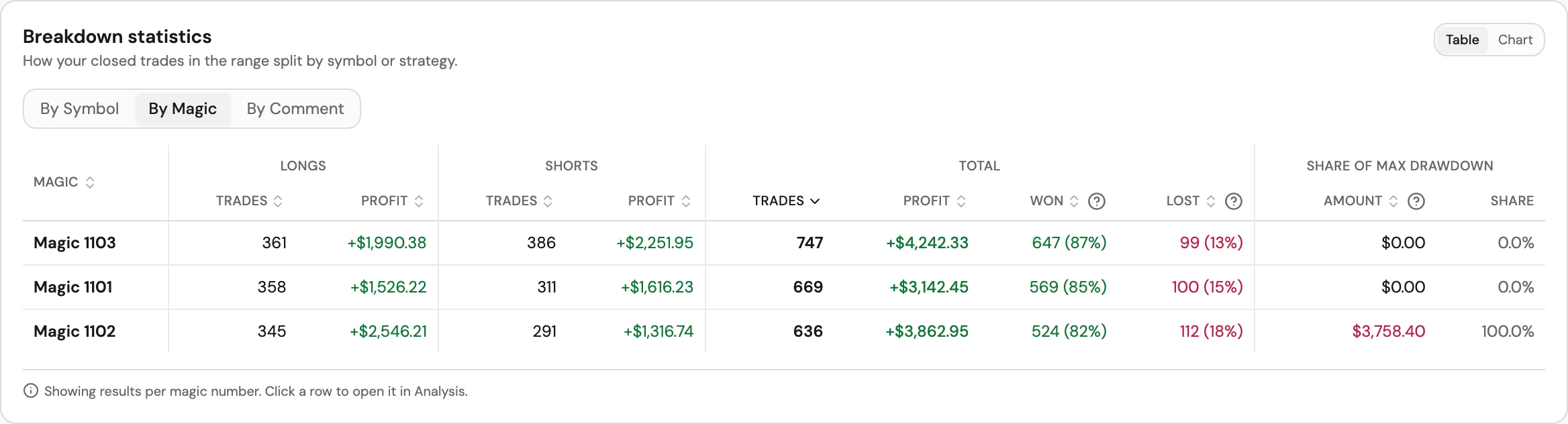
By profit, all three EAs look healthy. Magic 1102 made +$3,863 with an 82% win rate. By drawdown, it's a different account: 100% of the account's maximum drawdown came from magic 1102. The other two EAs contributed nothing to it.
A profit table would never show you that. You would only find out on the day it went wrong.
What a magic number is
A magic number is an ID an EA attaches to every order it sends (ORDER_MAGIC in MQL5). The positions and deals that come from that order carry the same number (POSITION_MAGIC, DEAL_MAGIC). It's how an EA recognises its own trades, and it's the only reliable way to tell several EAs apart on one account.
A few things worth knowing:
- Uniqueness is a convention, not a rule. The MQL5 docs describe it as "designed to ensure that each Expert Advisor places its own unique number". MT5 won't stop two EAs, or the same EA on two charts, from using the same magic. If they do, their trades are indistinguishable.
- Manual trades normally have magic 0. If you also trade by hand, your manual trades usually land in one bucket under 0.
- It can't be changed after a position opens. If an EA opened it with the wrong magic, it stays that way until the position closes.
- Netting accounts merge positions. On a netting account there is only one position per symbol, so two EAs trading the same symbol share it. Per-EA tracking needs a hedging account, which is what most prop firms and EA traders use anyway.
What MT5 shows on its own
| Where | Shows magic? | Drawdown per magic? |
|---|---|---|
| Toolbox → History tab | Yes, as a column (added in build 2450, May 2020) | No. Its documented filters are period and symbol, not magic |
| Exported history report (HTML/XLSX) | No. Users report the magic column is dropped from the export | No |
| Trading Report (Reports tab) | No. Splits results into trading robots, signals and manual trading | No. Drawdown is for the whole account |
| Strategy Tester report | Not needed: one EA per test | Balance and equity drawdown, but for one EA in a backtest, not your live account |
So MT5 can tell you which EA opened each trade. It can't tell you how much drawdown each EA caused on your live account. The Trading Report does show account drawdown, and rebuilds equity from price history to do it. But it treats every EA on the account as one block of "trading robots".
The DIY route: closed profit per magic in MQL5
If you're comfortable with MQL5, a short script can total closed results per magic number from the account history:
// Closed profit per magic number, over all history
HistorySelect(0, TimeCurrent());
for (int i = 0; i < HistoryDealsTotal(); i++) {
   ulong ticket = HistoryDealGetTicket(i);
   if (HistoryDealGetInteger(ticket, DEAL_TYPE) == DEAL_TYPE_BALANCE) continue;
   long   magic  = HistoryDealGetInteger(ticket, DEAL_MAGIC);
   double result = HistoryDealGetDouble(ticket, DEAL_PROFIT)
                 + HistoryDealGetDouble(ticket, DEAL_SWAP)
                 + HistoryDealGetDouble(ticket, DEAL_COMMISSION)
                 + HistoryDealGetDouble(ticket, DEAL_FEE);
   // add `result` to a running total for `magic`
}
That gets you profit per EA, and from it a closed-trade drawdown: the biggest fall in each EA's running closed total. It's a start, but it misses the part that actually breaches accounts.
Closed-trade drawdown vs. floating drawdown
A closed deal records where a trade ended, not how far it went against you on the way. A grid, martingale or recovery EA can sit $3,000 underwater for an hour, recover, and close the basket at a small loss. In the history, that hour never happened.
Here is the worst day on the same demo account, broken down by magic number:
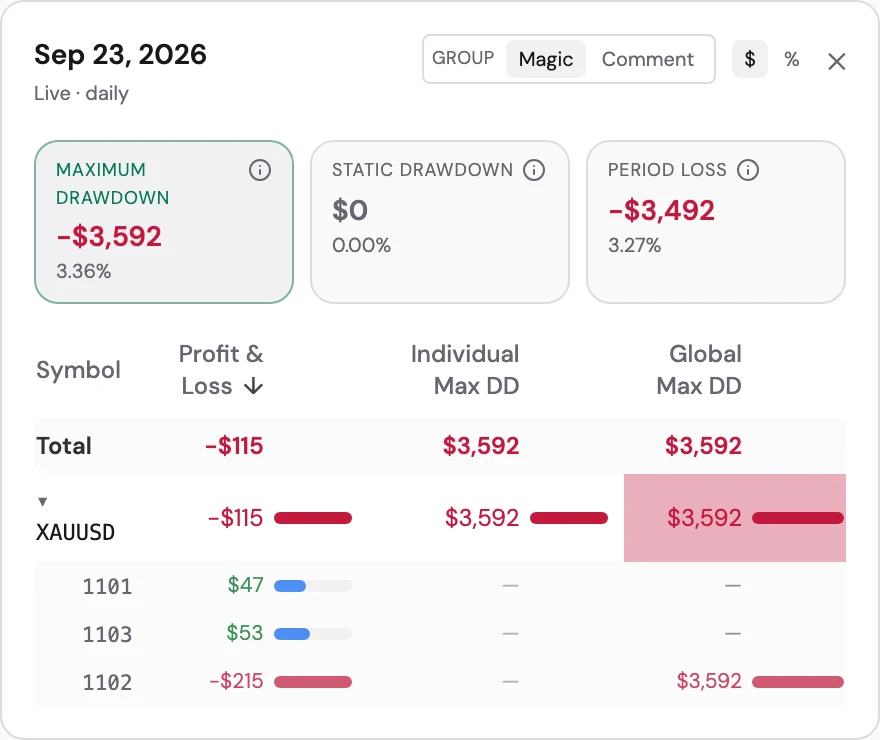
Magic 1102 closed the day at −$215. A closed-trade report would call that a quiet day. But while its positions were open, it took the account down $3,592, or 3.36%, against a common 5% daily loss limit. A 5% limit is usually measured on equity, including open positions, so that intraday drop is what the prop firm counts.
You can't rebuild that number from history afterwards. The only way to know it is to record each EA's open positions as they move.
Myfxbook and FX Blue
Both are popular for tracking EA performance, and both can group results by magic number. Neither is built around live drawdown per EA. As of October 2026, their own help pages say:
| Myfxbook | FX Blue | |
|---|---|---|
| Group by magic number | Yes, through Custom Analysis (not available on accounts that have used more than 200 magic numbers) | Yes, the Strategy tab, if the Publisher EA's PublishMagicNumbers option is on |
| How drawdown is measured | The worst of end-of-day equity, equity at each account update, and a growth-based measure | Balance-based: the largest fall from a balance peak |
| Drawdown per magic number | Not documented | Not documented |
| How often it updates | Every 2–4 hours by investor password; every few minutes with its publisher EA | Every 5 minutes by default with its Publisher EA (configurable down to 60 s) |
They're good at what they're built for: verified track records and profit statistics per strategy. FX Blue's own FAQ says historic equity can only be reconstructed from price data, as "a very good approximation". If your question is which EA is pushing my account toward its drawdown limit, right now and on which day, you need equity recorded per EA as it happens.
How DrawGuard tracks drawdown per EA
DrawGuard works by recording rather than reconstructing. You attach the DrawGuard EA to one chart on the account. It doesn't trade and doesn't touch your other EAs. Every 60 seconds it sends the account's equity and every open position, with its symbol, magic number, comment and floating profit. From that:
- Every day, week and month shows which magic number caused its drawdown. Click a day on the chart to see the day's maximum drawdown split by symbol, magic number and comment, like the screenshot above.
- Charts filter by magic number. Narrow the equity and drawdown charts to one EA, or to a few.
- Closed trades are broken down by magic too, with each one's share of the account's maximum drawdown next to its profit.
- Drawdown is measured the way prop firms measure it: from peak equity, from the starting balance (static), or from where the day opened.
- Alerts (on paid plans) email you when an account's drawdown crosses a limit you set, with presets for common prop firm rules.
Two honest limits. Drawdown is recorded from the moment the EA connects; it can import your closed trade history, but not the floating drawdown from before. And the terminal has to stay running, which in practice means a VPS or a machine that stays on. DrawGuard watches and warns; it never closes trades for you.
A short checklist for running several EAs on one account
- Give every EA, and every setfile you treat as a separate strategy, its own magic number. Write down which number is which.
- Don't reuse a magic number across charts unless you deliberately want those trades merged.
- Use a hedging account, so each EA keeps its own positions.
- Judge each EA on drawdown as well as profit. A high win rate and a large share of the account's drawdown often come together, especially with grid and recovery systems.
- Watch the combined number. Your prop firm measures the whole account, not each EA.
FAQ
Can MT5 show drawdown per magic number?
No. The History tab shows each trade's magic number, but MT5's reports measure drawdown for the whole account, and the Trading Report only separates robot, signal and manual trading.
Can I change the magic number of an open trade?
No. The magic number is fixed when the position opens.
Do manual trades have a magic number?
They normally have magic 0, so they group together, separate from your EAs.
Is closed-trade drawdown good enough?
It shows how each EA's realised results swing. It misses floating drawdown, which is usually what breaches a prop firm's daily or maximum loss limit.